Posts

Image
BOUNCE PROJECT         In my bounce projects I learned how to create a single up and down bounce, a couple bounce and a background for all 3. For this project being my second time animating something, I impressed myself. For my freestyle bounce I used a black background, made a dark red/brown oval and dragged half off the page. Then I drew on a couple circles and added contrast using different colors. I then animated my ball bouncing once then going into a hole and then back onto the page almost like a portal. If I were to do this again with more experience I would add a space ship taking the ball. I had not clue how to do that so I stuck to what I was used to. For my next project I would challenge myself more and more more slides so it goes a little smoother on and then off the page. All in all this project tested my understanding and grasp of the basics of animation.
Image
For this project I learned how to use photoshop to make an animation. This took me way longer than it should have but after the first 3 or 4 worlds I finally got the hang of it. I really liked how it turned out in the end. I wouldn't have changed anything if I could.

Finial Logo Haleegrace brum

Image
      This is my final logo. On the first day of this assignment I had a clear vision of what I wanted my logo to look like. I knew I wanted my full name and the color yellow. I like my full name because if you increase the font on "Brumbaugh" it looks the same amount of letters as "haleegrace". I choose the lemon because the color yellow makes me happy, and I only drink lemon water when I'm at restaurants. Its a silly quirk but any of my friends could tell you what I drink, its something I'm almost known for. originally I wanted to do something combining my two initials like most of my peers but combining H and B didn't look very pleasing to the eye so I ditched that idea. I really wanted to incorporate my middle name into my logo somehow. I kept trying to get fancy with different combinations of my initials but it just didn't look how I wanted. after a few days of extravagant logos and trial and error with the color yellow, I went back to...
Image
Color Schemes Of Logos Analogus Colors: This Logo used the analogous colors of yellow, yellow-green, and green. I think the company probably chose these colors because the flower catches your eye because its not something many people see every often  This logo uses the analogous colors of red, purple, and a violet. I think the company chose these colors because this combo is very welcoming using many shades and tints of red and purple which all look very good next to each other. Complementary Colors  This logo uses the complementary colors of yellow and purple. Although you see this combination very often now thanks to the Lakers, its not a likely color combination. When most people see these colors together they think lakers. Smart marketing move on the larkers.  This logo uses the complementary colors of orange and blue. The company chose these colors because you can recognize the colors very easily. Warm Colors This logo uses the warm colors of yell...
Image
what I learned  In this project I learned anatomy of typeface. We were asked to write out our names, put three lines to represent the capital and lowercase letters. Then name all the different components that name up our name. How this project went Ive definitely had better work. Figuring out all the parts of my name was challenging but I'm glad I'm done and it could look a lot worse.
Image
CARP homecoming poster The project In this project we were asked to take the homecoming poster that the office made then reconstruct it using CARP (contrast, alignment, rhythm/repetition, proximity). I made the raven mascot smaller, increased the font on everything but the dates, put times and headings in bold, and changed the location of the times so they would be even with one another. What I learned In this project I learned how small changes can make a huge difference to the paper. Using CARP is actually useful because if the office would have just used four basic ideas, we wouldn't have had to fix it for a project. when the wrong things are emphasized, the paper draws no attention and not many people will take time to look at it even if its important information that the reader may need. How it went This project was easily my best. I knew exactly what changes to make to change this poster so it would be more appealing to students at ONW. I got this project done ...
Image
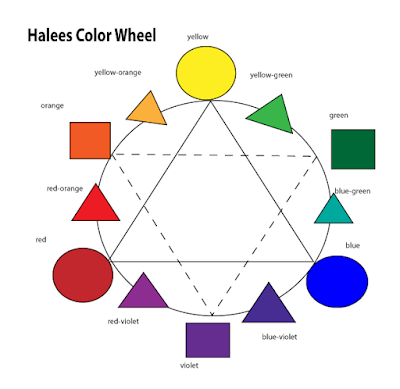
Color Wheel    Our project was to create a color wheel on Adobe Illustrator. First we learned about colors and colors schemes. Then we learned how to use adobe illustrator. The point of the project was to get a basic understanding of Adobe illustrator and the color wheel because we will use both in many different projects in the near future.     I learned how to make shapes, change the colors, make dotted lines, add text, and how to import images into my blog. Having a basic background to illustrator and the color wheel came in handy just two days later when we had to identify color terms and find logos that matched the definition.    If I were to do this again I would spend less time trying to figure out short cuts on how to make shapes and just do everything by hand. Also, I would spend more time of color selection and get lighter hues for my own aesthetic pleasure.